

- run Devin for Terminal directly inside an isolated E2B sandbox
- run a Devin Outposts worker in an E2B sandbox and route Devin sessions to it
Run Devin for Terminal
Devin for Terminal runs directly from a terminal. Install it in a sandbox to give Devin an isolated workspace without access to your local machine.Run Devin Outposts in E2B
Use the publicdevin-outposts template to run an Outposts worker and its setup UI inside an E2B sandbox. The template includes the Devin CLI, starts the setup UI on port 3000, and reserves /mnt/repos as the worker workspace.
Open the Devin Outposts template
Start the template in the E2B dashboard and open its terminal.
myw11k4t1jtjbr7ckvz8.
Open the setup UI
When the terminal connects, it prints the exact setup URL for that sandbox and the command that reads its sandbox-local control token. The URL has this shape:E2B_SANDBOX_ID. A self-hosted E2B deployment must configure its own E2B domain when building the template; the sandbox cannot infer that public domain from its runtime ID.
Read the setup token inside the sandbox:
Configure the worker
The setup UI asks for credentials and routing information from your Devin organization:| Value | Purpose |
|---|---|
| Devin API key | List and message sessions after this worker claims them |
| Devin API URL | API endpoint for your Devin deployment |
| Devin organization URL | Full /org/<slug> page used to open the task composer in the same organization as the API selection |
| Organization | Organization that owns the sessions |
| Outposts pool ID | Virtual environment the worker joins |
| Outposts worker token | Authenticates the worker to that pool |
/org/<slug> URL controls where Devin creates the browser session. These must refer to the same organization; an origin-only URL such as https://app.devin.ai is rejected because it would inherit the browser’s last selected organization. Confirm the pairing in the setup form after selecting the API organization. Changing either value requires confirmation again.
Send a task to the Outposts worker
Wait for the worker process
The template UI header should say Process running. This means the local worker process is alive. Before sending work, also verify that the pool is available in Devin; process state alone does not prove registration.
Describe the task
Enter what Devin should build, change, or investigate. The template adds instructions to use
/mnt/repos and to stop when the wrong virtual environment was selected. Nothing is sent while you type.Open Devin with the prepared task
Choose Open Devin with this task. A new Devin page opens with the prompt pre-filled, but the task is not sent yet.
Open Configuration in Devin
Look directly below the prompt. Select the Configuration button beside the attachment and effort controls, then open Virtual environment.
Select the Outposts pool
Choose the virtual environment whose name exactly matches the pool shown in the template UI. Devin labels registered pools as Outpost environments. Do this before selecting Send.
/mnt/repos. If Devin reports a different workspace, such as /home/ubuntu/repos, the session is running on a managed Devin machine instead of the selected Outposts environment.
The session is routed correctly when Devin works in
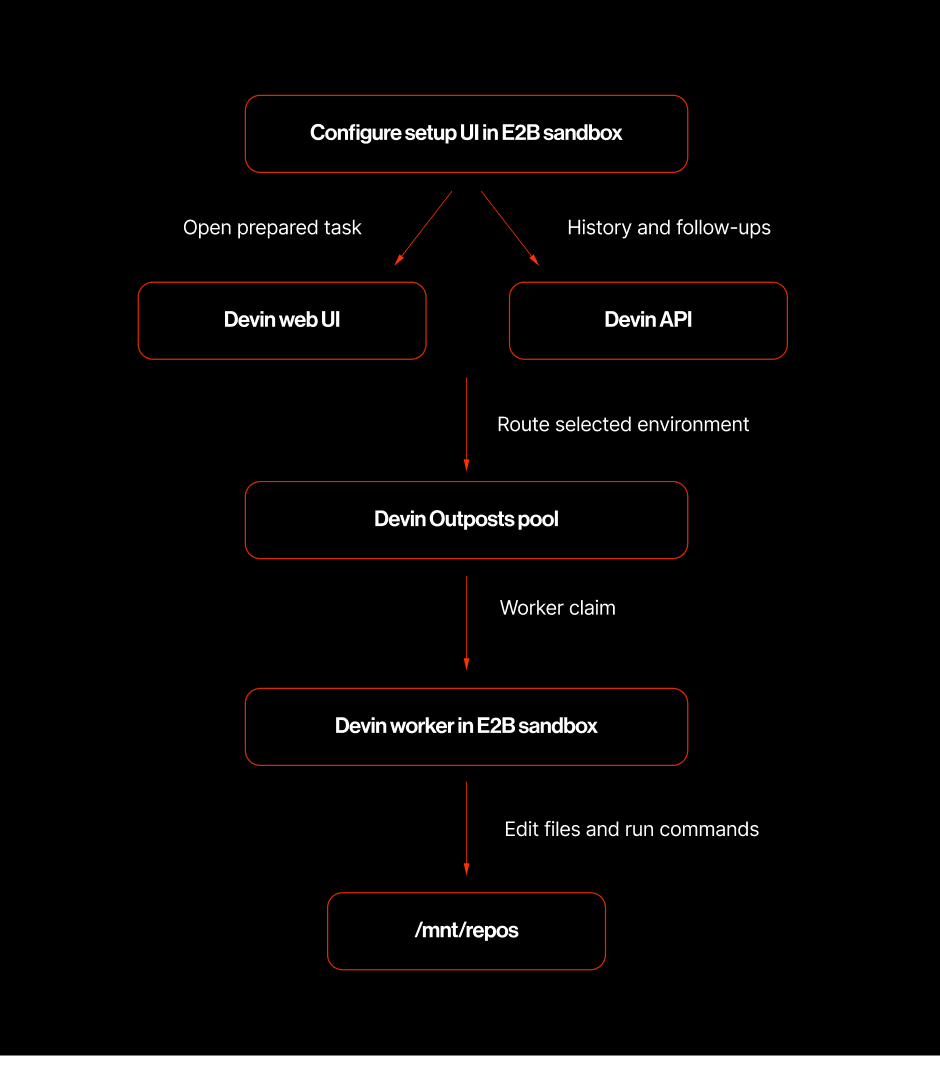
/mnt/repos, does not ask you to choose a repository path, and the session appears in the template UI after the worker claims it.Creating a session through the public Devin v3 API does not currently select an Outposts pool. The initial task is therefore sent from Devin’s web UI, where the virtual environment can be selected. After the worker claims the session, the template UI can display its history and send follow-up messages through the API.
Verify the worker
The worker log is the first place to check startup and claim failures:serving session <session-id> or a structured session_id field. Once attached, the setup UI polls the session history and renders Devin’s messages as they become available.
How the integration works
Limitations
- A Devin API key does not start an Outposts worker. The worker also needs a pool ID and worker token.
- Existing Devin sessions remain assigned to the worker that claimed them. Do not assume a follow-up will migrate an old session to a replacement worker.
- Devin can assign a new task to any available worker in the selected pool. Use a dedicated pool, or stop stale workers, when validating a specific sandbox or template build.
- Use scoped, short-lived Outposts worker tokens when available.
- Web apps started by Devin can be opened through their E2B sandbox preview URLs.